01
Leads wait for a response
A prospect reaches out while the team is busy, after hours, or handling another customer.
Give customers and prospects a consistent first response across your approved business channels. The agent can answer routine questions, collect the right information, qualify leads, update your CRM, create follow-up tasks, and bring your team in when human judgment is needed.
Custom rules · CRM integration · Human escalation
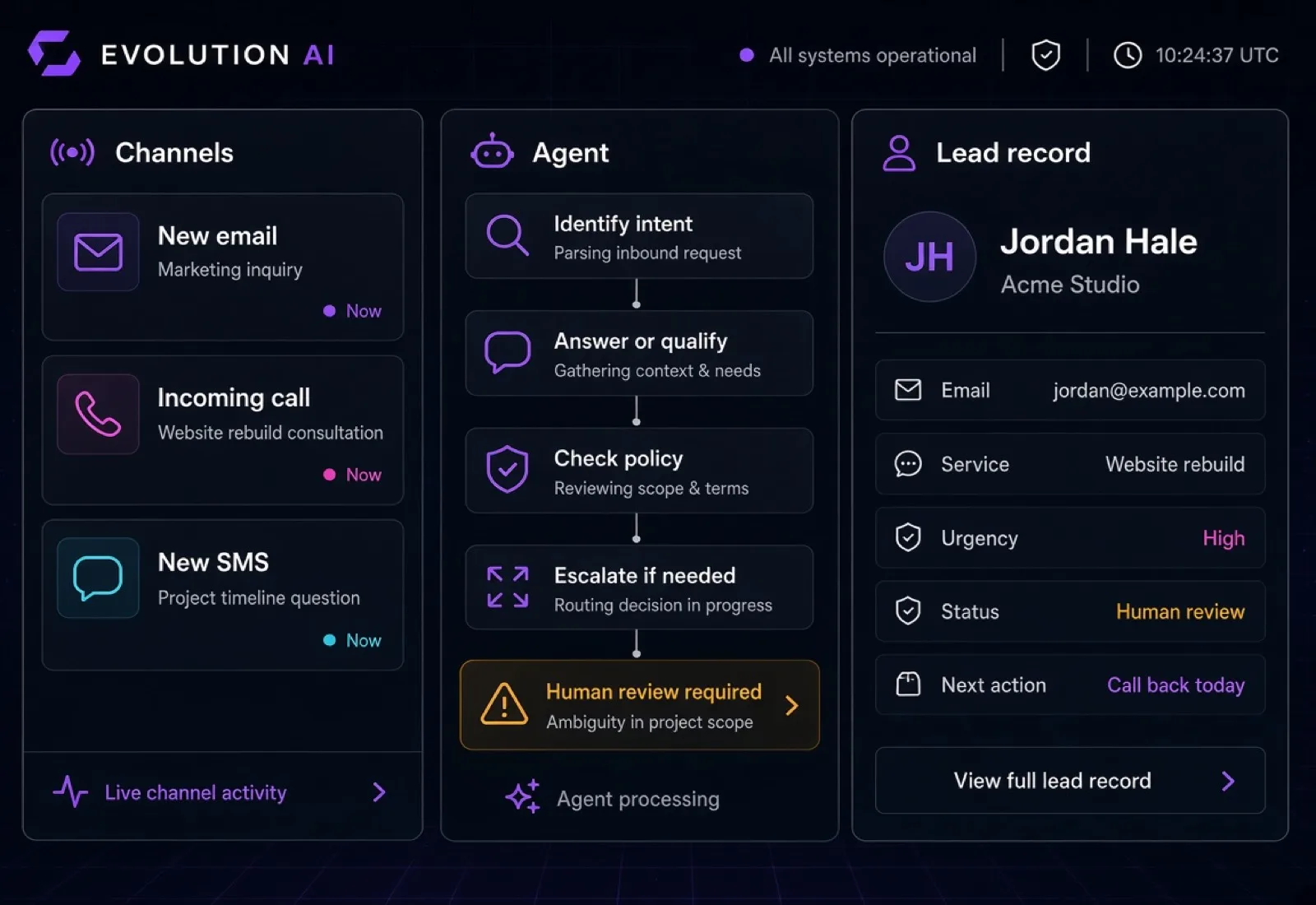
Workflow stages
The Front-Office Gap
Business communication arrives through multiple channels at different times. When email, calls, SMS, and CRM updates depend entirely on manual work, response quality and follow-up become inconsistent.
01
A prospect reaches out while the team is busy, after hours, or handling another customer.
02
Important details are missing because every person asks different questions or records the answers differently.
03
Emails, call notes, and text messages remain scattered across inboxes and phones.
04
A lead may receive an answer but no assigned owner, next step, reminder, or documented outcome.
The issue is not only answering faster. It is creating one reliable process from first contact to the next action.
How It Works
We define what the agent may handle, what information it should collect, which systems it may access, and when the conversation must move to a person.
01
The request arrives through an approved company email address, phone number, SMS channel, web form, or another connected source.
02
It classifies the message or conversation: new lead, existing customer, scheduling request, support question, billing issue, spam, urgent request, or another defined category.
03
The agent can answer supported questions using the company's approved knowledge, request missing details, or acknowledge the message and set expectations.
04
For new opportunities, it collects the information your team needs, such as service requested, location, timing, budget range when appropriate, and preferred next step.
05
The workflow creates or updates the contact, saves the communication summary, records the source and qualification details, and sets the correct status.
06
The agent can assign an owner, schedule a follow-up task, send an approved confirmation, or route the lead to the appropriate team member.
07
Sensitive, urgent, unusual, low-confidence, or policy-restricted conversations are transferred or flagged for human review.
One Coordinated Front Office
Read approved inboxes, classify messages, prepare or send rule-based responses, summarize threads, and route conversations to the right owner.
Answer supported inbound calls, provide approved information, collect caller details, qualify the request, summarize the conversation, and transfer or escalate based on your rules.
Respond to routine text messages, collect information, send approved confirmations or reminders, and preserve the conversation context.
Process form submissions or chat requests, identify intent, collect missing details, and create the appropriate CRM record and next step.
Create or update contacts, save summaries, set source and status, assign an owner, and create follow-up tasks according to the workflow.
Alert the team through approved channels when a high-priority lead, urgent request, failed workflow, or human decision requires attention.
Available integrations depend on the client's providers, plans, APIs, permissions, security requirements, and existing systems.
Structured Lead Intake
The agent follows a qualification flow designed for your business instead of asking generic questions. It collects only the information needed to route the opportunity and define the next action.
Example lead record
Qualification status examples
Your team receives a structured record and conversation summary instead of a disconnected voicemail, email, or text thread.
Controlled Automation
A production communication agent needs clear boundaries. We build permissions, escalation rules, auditability, and failure handling into the workflow from the beginning.
Responses use the information, policies, hours, service details, and FAQs approved by your business.
Reading, replying, sending, transferring, scheduling, and CRM updates are enabled only for the actions you approve.
The agent flags or transfers conversations that are sensitive, urgent, uncertain, out of scope, or explicitly request a person.
The experience should clearly identify the automated assistant where appropriate and never misrepresent it as a specific human employee.
Store summaries, status, timestamps, and workflow outcomes according to the client's approved retention and access rules.
If an integration fails or required information is unavailable, the workflow stops safely, records the issue, and alerts the correct person.
Call recording, transcription, automated messaging, and outreach features must be configured for the client's use case, consent process, applicable requirements, and provider policies. The agent must not make financial, legal, medical, contractual, or other high-impact commitments unless an explicitly approved workflow and qualified human review allow it.
Real Workflow Examples
The agent answers, explains that it is the company's automated assistant, collects the caller's contact details and service request, applies the qualification rules, creates the CRM record, and schedules or requests the next step.
The agent identifies the inquiry, checks the approved knowledge base, prepares or sends an allowed response, records the summary in the CRM, and assigns follow-up when needed.
The agent keeps the conversation context, answers a supported question, confirms the next step, and alerts a person if the request falls outside its permissions.
The agent gathers the minimum necessary context, avoids unsupported commitments, marks the conversation for human review, and notifies the correct owner.
The workflow attempts to match the sender to an existing CRM record, appends the new interaction, and avoids creating unnecessary duplicates when the available identifiers support a reliable match.
The system creates the task or approved draft, checks suppression and status rules, and waits for human approval when the workflow requires it.
Custom Implementation
Document every channel, inquiry type, current response path, team owner, and handoff.
Define approved answers, prohibited statements, qualification questions, office information, and escalation triggers.
Connect the approved inboxes, telephony provider, SMS service, forms, notifications, and other communication tools.
Map fields, deduplication rules, statuses, assignments, notes, follow-up tasks, and read-back verification.
Test normal conversations, edge cases, failures, permissions, escalations, and logging before production use.
Launch the workflow in stages, document the system, train the team, and refine the rules from real operational feedback.
How We Build It
01
We review how inquiries arrive, who handles them, what information is needed, and where leads or follow-ups are lost.
02
We define supported intents, approved answers, qualification logic, permissions, handoffs, and human-review triggers.
03
We connect the selected email, voice, SMS, CRM, forms, calendar, and notification systems included in the project scope.
04
We test real examples, ambiguous requests, duplicate contacts, unavailable tools, opt-outs, urgent conversations, and escalation paths.
05
We begin with limited permissions or draft-only responses, review performance, and expand automation only after the workflow is reliable.
FAQ
Build Your Front-Office Agent
Show us how your business handles email, calls, texts, and leads today. We will map the workflow, identify the safest automation opportunities, and design an agent that works with your team and CRM.
Free consultation · No commitment · Clear workflow assessment